
Try Avenue Proof on your own business.
Avenue Proof shows your finished jobs on a map on your website. Here is what you get and what to expect.
Proof, not promises.
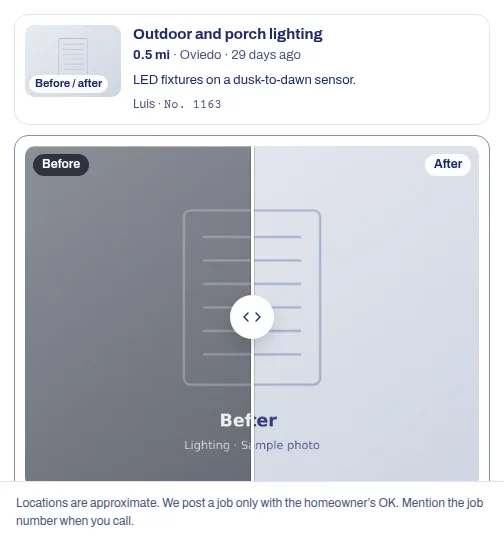
People hiring a contractor want to see the work. Slide the handle to see what a visitor sees on every job.
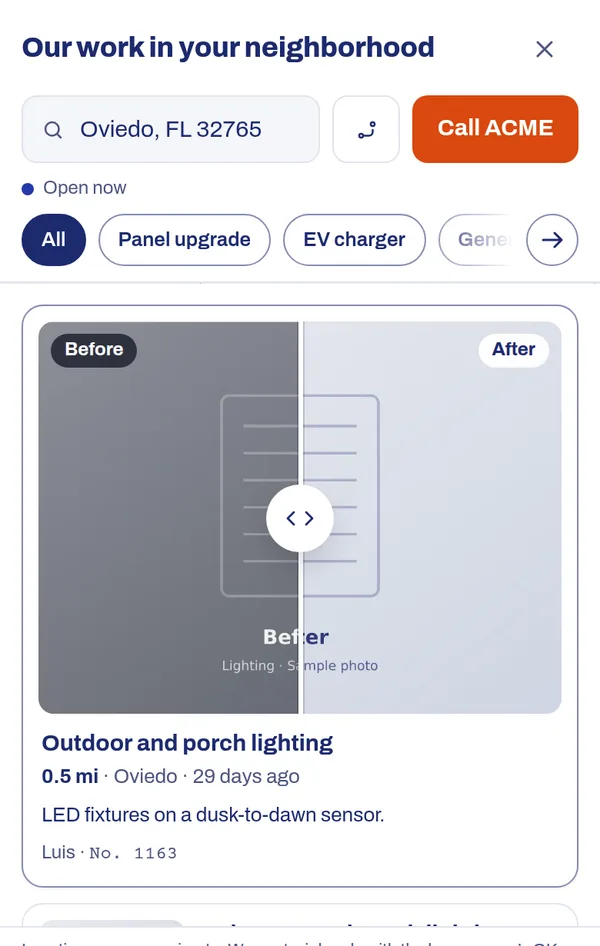
It works the same on a phone, where most of your visitors are.
Everything, from the first day.
Your trial is the real product on your own business, not a cut-down demo.
Your finished jobs on a map, on your website
A “See work near you” tab on your site opens a map of your recent jobs near each visitor. Numbered bubbles split into pins as they zoom in.
Proof that looks like your work
Before and after photos, the job type, the town and the date on every job. Visitors slide between the photos to see what changed.
Jobs from the CRM you already use
Housecall Pro, Jobber, ServiceTitan, Workiz, Zoho CRM, or any CRM by webhook. No CRM? Post finished jobs by hand from a phone.
Your customers’ homes stay private
Pins sit a safe distance from the home, never on it and never on a lake. A job is only posted with the homeowner’s OK.
Calls, even after hours
A call button and text button, and after-hours call backs when the office is closed, so a visitor never hits a dead end.
Numbers that prove it
Analytics: tab views, panel opens, ZIP searches, job views and call taps, and which towns your visitors come from.
What it costs
Free trials aren’t open on this site yet.
Tell us about your business and Branch Avenue will set you up by hand, and talk through a plan and a price.
What to expect, day by day
7 days goes fast, so we help you move quickly.
Sign up, about 3 minutes
Create your account, name your business, pick a plan and add a card. $0 is charged. You land in your own private workspace.
Add one line to your site
Branch Avenue follows up to help. You paste a single script tag, or send it to whoever manages your website. It loads after your page, so it doesn’t slow your site.
Post your first jobs
Connect your CRM, or post finished jobs by hand from a phone. Once 3 jobs from the last 60 days are live, the tab appears on your site.
The trial ends
Your card is charged for your plan, and it renews monthly. Not for you? Tell us before this day and pay nothing.
Your part
- Add one line of script to your website, or send it to your web person
- Post a few finished jobs (or connect your CRM so they arrive on their own)
- Have your techs reply to the photo text with before and after photos
Our part
- Reach out when you sign up and walk you through setup
- Help you connect your CRM, or any CRM by webhook
- Keep every pin a safe distance from your customers’ homes
What happens on day 7
No surprises. Here is exactly what happens when the trial ends.
- Your first charge. When the 7-day trial ends, your card is charged for the plan you picked.
- Then monthly. Your plan renews each month until you tell us to stop.
- Everything carries on. Your workspace, jobs, photos and settings stay just as they are.
- Want out? Tell us before the trial ends and you won’t be charged.
- Changing or cancelling later. Contact us and we’ll sort it out.
Invite a friend, get a free month
Every account gets a personal invite link. When a business you invite becomes a paying customer, you get a free month.
Questions about the trial
Will I be charged today?
No. You pay $0 today. Your card is saved securely by Stripe and is first charged when the trial ends.
What happens if I do nothing?
When the trial ends, your card is charged for the plan you picked, and it renews monthly after that. If you don’t want that, tell us before the trial ends and you won’t be charged.
How do I cancel?
Tell us before the trial ends, using the contact page, and you won’t be charged. To change or cancel a plan later, contact us the same way.
Do you see my card number?
No. Card details go straight to Stripe, our payment provider. We only see that a card is on file.
What if I don’t have many jobs to post yet?
The tab appears on your site once 3 jobs from the last 60 days are live. Until then it stays hidden, so visitors never see an empty panel. Your own workspace works from day one.
Do I need a CRM?
No. A CRM makes it automatic, but you or your techs can post finished jobs by hand from a phone. You do need to be able to add one line to your website, or have someone who can.
Who can see my jobs and photos?
Only your team, and the people who use your widget on your site, who see the jobs you’ve published. Every client’s data is kept separate from every other client’s.
Talk to us about your business
We’ll walk through how the widget would work for you, and put together a plan.